How to Build an Army for the Starcraft Tabletop Miniatures Game
By Aaron Kamakawiwoole
Hey Reader!
It’s Shipping Week! Preorders for the Starcraft TMG are heading out from Poland, so within the next few weeks we’ll have some miniatures to show you! In the meantime, now that the Core Rulebook PDF is out and free to download, we’re kicking off our gameplay series by walking through how you build your force, and how multiple mechanics work together to prevent the game from becoming stale and settling into a swift “meta” for competitive play.
We’ll be using a Protoss army as our example today: a powerful psionic alien race with elite warriors, huge mechs, and powerful spellcasters.
I. Select Your Faction
At launch, the game has two faction choices for each race (so six factions), with additional factions coming later in the year (and in future years). Each faction has a different emphasis (offensive play, damage mitigation, maneuver, etc.), and this makes replaying the game, even with the same units, different from game to game.
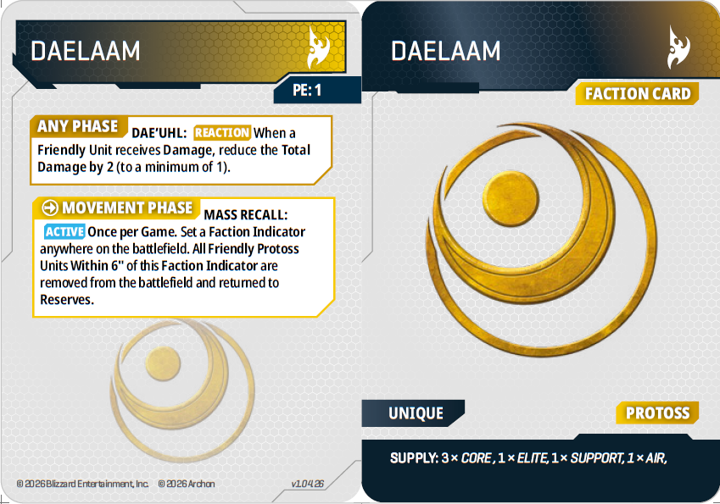
This is healthy: it allows for different strategies and tactical opportunities, while also keeping the game from becoming too complicated. And with the faction cards at the start being very good, this is not likely to be an area of “stat creep” in the future (which I’m 100% in favor of avoiding!). So people who buy starter armies will have excellent faction choices, even as the game progresses in the coming years.
Faction cards also generate unit supply slots and resources – more on that in a bit.
II. Select Your Tactical Cards
Once we have our faction selected, we can choose our tactical cards: structures and strategies in the game that give us three bonuses (labeled in the example Warp Gate below). First, they provide abilities that can be used once per round: if you want to use the ability, resolve the ability in the appropriate phase (Movement, Assault, Combat, or Any, in the case of reaction abilities), and flip the card facedown (so you and your opponent know the card is used for the turn).
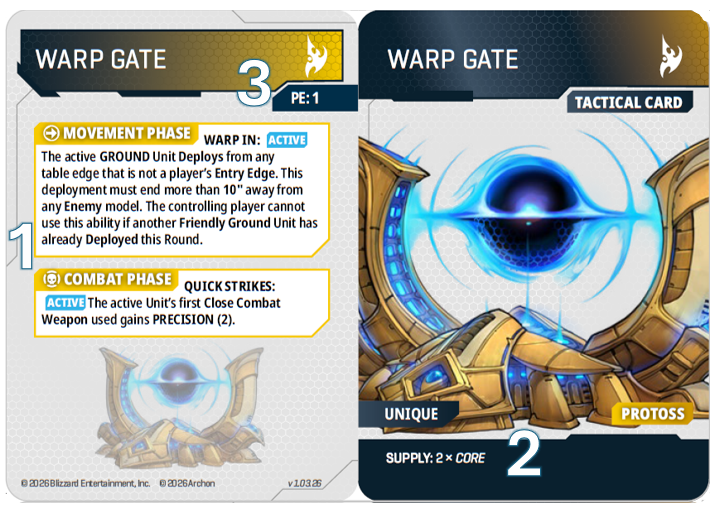
Second, tactical cards provide Supply Slots: these will determine what kinds of units (Core, Elite, Support, Air, and Hero) you’ll be able to field in the next step. So as you change out tactical cards from one game to the next, your ability to field specific units will change, thereby changing the nature of your next game in ways that are unique to Starcraft.
And finally, tactical cards provide Resources. Each faction uses a different resource to power the abilities on their units: Command Points for Terran, Biomass for Zerg, and Psionic Energy (or “PE”) for Protoss. Each card (including your faction card) provides 1-2 of your faction’s resource, and you can tap the card either for one of its abilities, or for its resource.
So during each turn you’re making a decision: do you want to use the ability on your tactical card, or do you want to pass on that ability to fuel the abilities on one of your units? This makes cards that are more niche in their abilities (like revealing Hidden units, which may not be present in your opponent’s force) useful every turn: if their abilities won’t work, you can still tap them for their resource, which is a very cool function to make all tactical cards playable (which is not true in every game).
Each tactical card costs Vespene Gas: a separate resource from what you’ll spend on your army in the next section. Your maximum Vespene Gas is equal to 10% of your maximum Minerals, which means at 1000pts (skirmish level) you’d have 100 Vespene Gas (which is enough for typically 3-4 tactical cards, plus your faction card), and at 2000pts (standard level) you’d have 200 Vespene Gas (which is enough for around 6-8 tactical cards).
And now that we have our Supply Slots to limit what we can add to our army, let’s grab some minis and build a force!
III. Select Your Forces
All units in the game cost a number of Minerals, one of the traditional Starcraft resources, and these are the “point costs” for this game. Units start as either individual miniatures (heroes), or small units (ranging from 1-12 models), and some can be upgraded to large units (increasing their model count by 50-100%).
Each unit takes up a certain amount of Supply (just like they do in the RTS game, though the numbers are more abstracted in the tabletop game for ease, as we’ve marked below), so larger squads will require more Supply, thus requiring more tactical cards, while also limiting their deployment options (more on supply limits in the next section). So while larger squads are more powerful, they are also harder to wield together, as you may find you can’t deploy them when you want them based on the units you already have on the board (in the RTS game this is called a “supply block” and is a whole strategic element as well).
Most units will also have upgrades available to them: you can field a small unit of Protoss Zealots for 160pts, but if you take the My Life for Aiur upgrade, they will hit with more force when they charge into combat.
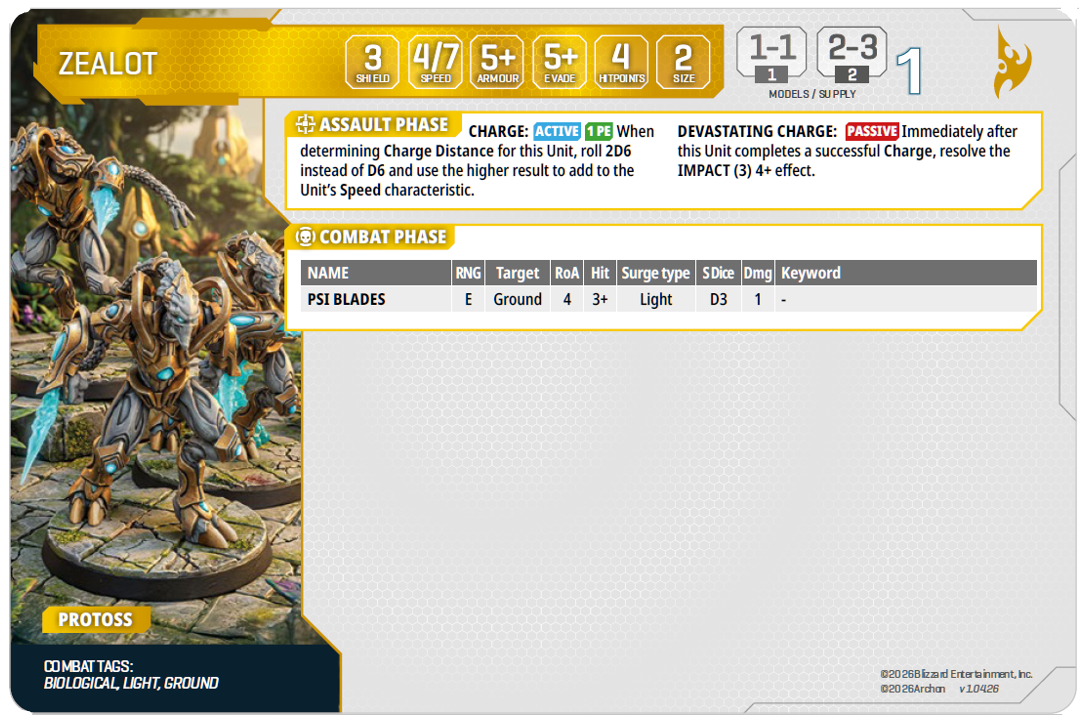
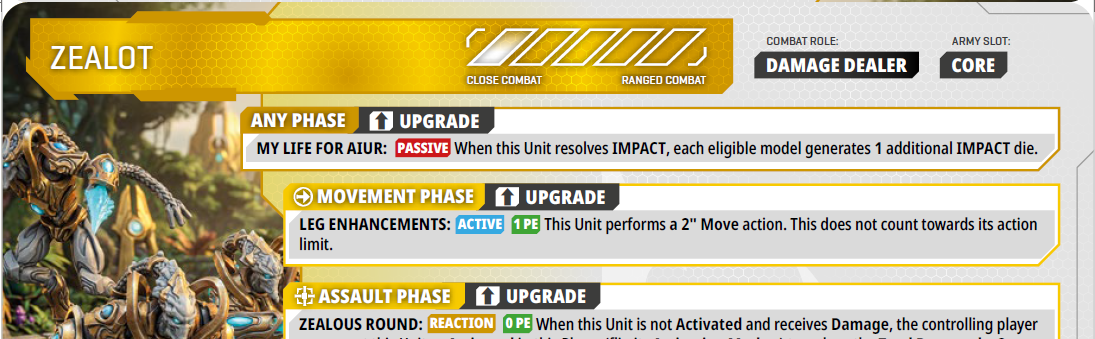
So when spending your Minerals, there are three questions you are asking, all of which change your gameplay experience from game to game: how big do you want your squads to be, how many units do you want to field, and how many upgrades do you want them to have? Some units may do fine without many upgrades, while others may be heavily dependent on upgrades to be effective.
Once you’ve spent all of your Minerals, your army will look something like this:
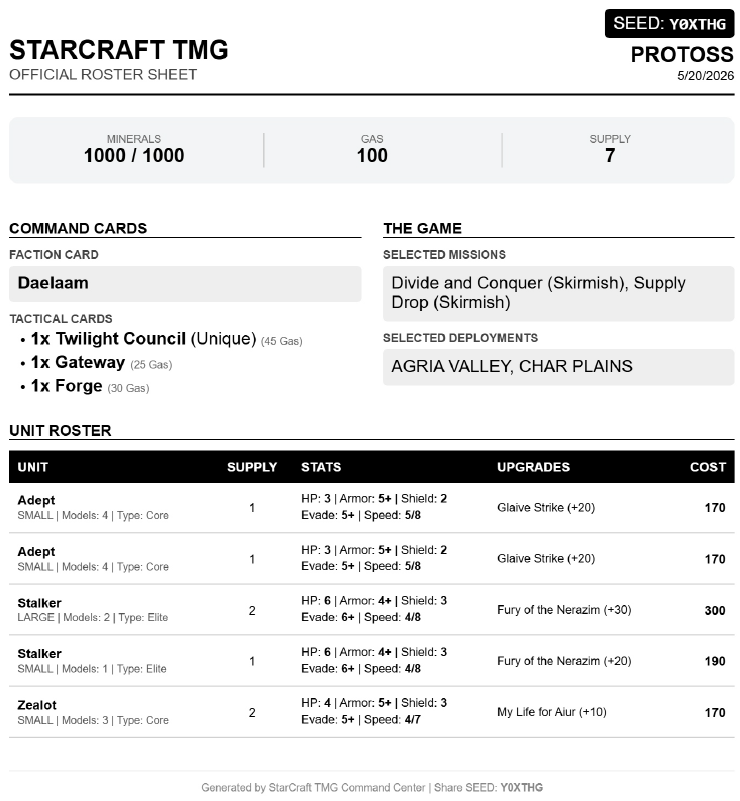
Now one last thing remains…
IV. Select Your Deployment and Mission Cards
Very similarly to Star Wars Legion, you get to pick your preferred deployment and mission objective cards, and contribute that to a pool. Players will then collaboratively select the deployment style and mission objective through a veto system, removing options they don’t want until one is left standing (with one player having final say over the deployment style, while the other having the final say over the mission objective). Below you’ll see a few examples of missions and deployment styles:
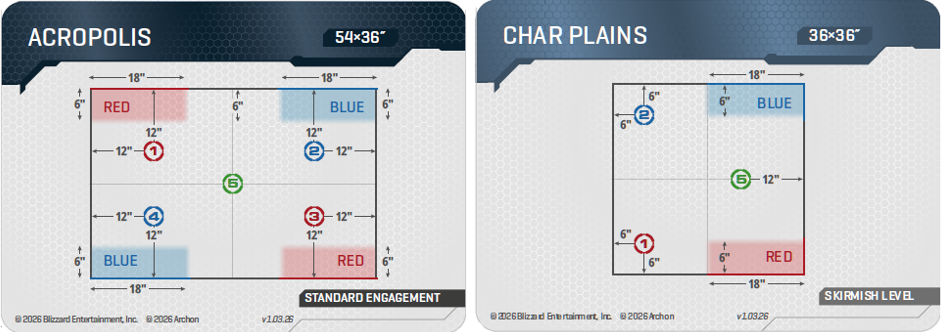
As you can see, your force could start all together, or you may have the option to deploy in different parts of the map. These may favor or challenge specific armies, where synergies between units may come into play, all while managing Supply to make sure that the synergizing units can deploy at the same time.
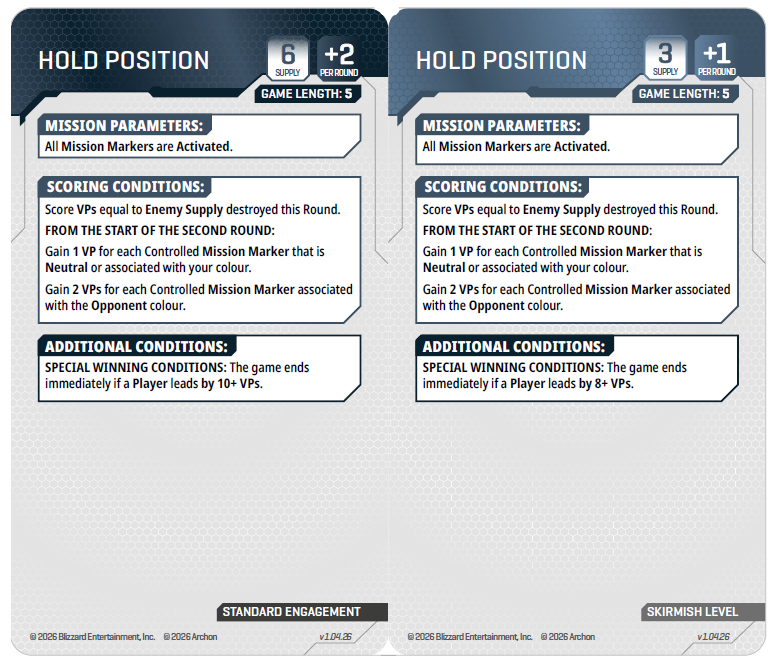
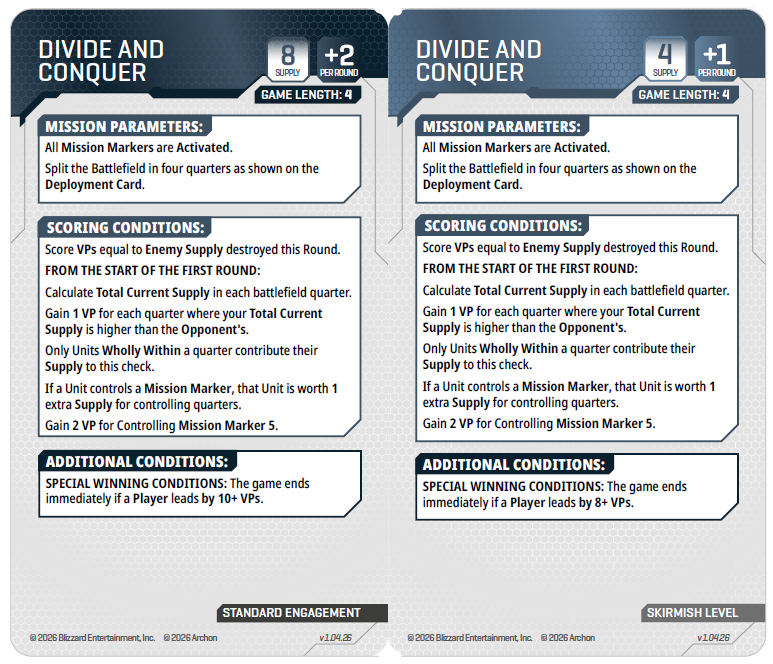
Similarly, some missions may require your army to spread out, while others may play perfectly well with a single, massive ball of units marching steadily across the board. So after knowing what your army will look like, select two deployment styles and two mission objectives for your force, and you’re set!
Conclusion
One of the things I love about this game is how many ways the game makes replayability so easy to do. In most games I’ve played, about half my army (or more) is the same from game to game, because those are “the good things to run,” but in this game, between tactical card choices, faction selection, and the flexible spending on units, I’ve found that very few units will be staples of my force in Starcraft, as I may need to emphasize different things depending on the points level, potential objectives, and answers to potential crises. And that’s encouraging when a new game is dropping!
Until next time,
Aaron Kamakawiwoole